
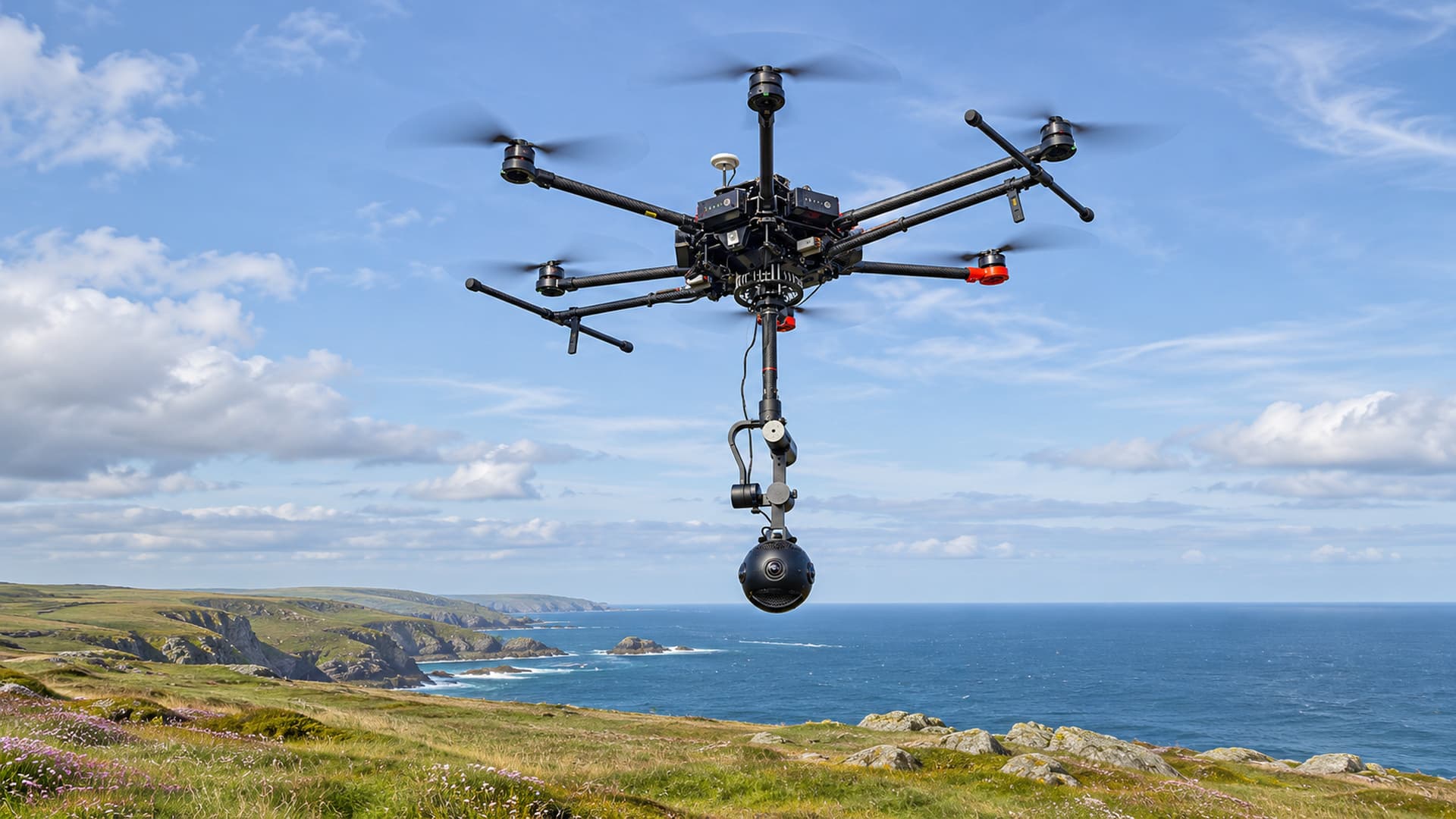
Aerial 360° video in South Africa: why planning and compliance matter as immersive filming grows
Aerial 360° video lets a viewer look around a scene while the camera moves through it. For tourism, property and events, that can reveal the relationship between a location and its surroundings in a way a fixed aerial frame cannot. It also changes the production brief: the camera records in every direction, and the viewer may look somewhere the filmmaker did not expect.
The technology is developing alongside an increasingly important conversation about unmanned-aircraft safety. In a 2026 SACAA Skywatch article on drone-planning software, the South African Civil Aviation Authority emphasised that digital planning tools support, rather than replace, pilot judgement and operational procedures. That message matters to any organisation commissioning aerial immersive footage.
A successful aerial 360° project needs a clear viewing purpose, a realistic flight plan and an understanding of permissions before production day. High resolution alone cannot resolve an unsuitable location, a confusing viewing experience or an operation that cannot be conducted safely.
What makes aerial 360° footage different?
A conventional aerial video usually directs attention through the camera's framing. The operator chooses the subject and controls what appears at the edge of the shot. In spherical video, a specialised camera system captures overlapping views that are combined into an image surrounding the viewer. A person can look left, right, up and down while the recorded footage plays.
That freedom can help communicate context. A tourism viewer might look from a landscape towards a lodge and then back towards the surrounding terrain. An event viewer might explore the relationship between a venue, access areas and nearby facilities. In a property presentation, the surrounding environment may be as relevant as the building itself.
The ability to look around is not the same as freely flying through a location. In ordinary recorded 360° video, the camera's movement is captured during filming. The viewer changes their viewing direction but does not normally choose an entirely new flight path through the scene. Interactive applications can add other forms of navigation, but those should be specified separately.
This distinction affects the story. The production team should plan what will be visible throughout the scene, not just what appears in one direction. The viewer needs enough time to notice and explore the surroundings. A fast-moving camera or an important action that happens outside the viewer's view may reduce the value of the immersive format.
A current safety discussion: digital tools have limits
The SACAA Skywatch article discusses the use of mapping and flight-planning software in drone operations. Such tools can help organise information and support a pilot's decisions, but the article cautions that they may not show every changing condition. Weather, newly introduced obstacles, airspace restrictions and human factors still require attention.
That is relevant for commissioning organisations as well as pilots. A visually attractive proposed route is not necessarily an authorised or suitable flight. A software map, a property owner's invitation or an open patch of land does not on its own establish that an operation can proceed.
For commercial operations, confirm that the operator has the applicable approvals, personnel and aircraft documentation for the proposed activity. SACAA's unmanned-aircraft information explains that requirements differ by operation type and provides a table of required approvals. The operator should confirm the current rules, airspace and permissions for the actual site and operation.
Do not copy a general recreational-drone checklist into a commercial filming brief and assume it covers the work. The details can depend on the operation, aircraft, operator approvals, location and applicable conditions. Rules and official guidance can change; the responsible operator must verify them before flying.
Why the location needs an early review
The subject of an aerial 360° film may be a hotel, industrial site, event venue or landscape. Each brings a different combination of access, airspace, property, privacy and operational considerations. A venue near an aerodrome or sensitive facility may require additional checks or may not support the requested flight.
Share the intended site and dates with the operator early. Identify any controlled or restricted access, operating hours, nearby people, ground activity, obstacles and the places from which the crew can safely work. If filming needs to show a particular activity, explain whether it can be scheduled separately from the flight and what permissions are required.
Property access and aviation authorisation are different matters. A property manager may grant access to the site, but the operator must still determine the applicable aviation requirements. Equally, an aircraft's operational approval does not automatically provide permission to film identifiable people or enter private property. Obtain advice appropriate to the project and the relevant authorities.
Weather is another production dependency. A 360° camera captures the whole environment, so the quality of the light and visibility affects more than a single framed subject. Wind and other weather conditions can also affect whether the aircraft can operate. Build an alternative date or a decision process into the schedule rather than promising a flight regardless of conditions.
Directing a story when viewers can look anywhere
A good immersive sequence gives the viewer a reason to explore while still making the story understandable. Start with the experience you want the viewer to have: orient themselves above a landscape, understand the relationship between buildings, or see the scale of an event site. That purpose guides the choice of viewpoint and movement.
Consider where the viewer is likely to look when the scene begins. If the most important subject is behind them and the shot ends immediately, they may miss it. A longer opening, a natural visual cue or a carefully designed transition can help without forcing the viewer to face one direction.
The production team also has to consider the whole spherical frame. Crew, vehicles, temporary equipment, reflections or private information may appear in directions that a conventional camera would exclude. Agree on site preparation and any necessary permissions before filming. Avoid promising that every unwanted element can be removed cleanly in post-production.
Movement deserves particular care when footage will be watched in a headset. A camera path that looks dramatic on a monitor may feel uncomfortable to some viewers in immersive playback. Test the intended motion and duration with representative viewers, and provide a desktop or mobile option where it suits the audience.
Resolution is only one part of quality
A 360° image spreads its pixels around a sphere. A viewer looking in one direction sees only a portion of that image at a time, so the apparent detail in a headset or browser depends on the source, encoding, display and viewing window. A headline resolution describes the source but does not by itself guarantee that a distant sign, face or building detail will be readable.
Stitching combines the camera's overlapping views into a spherical result. Nearby objects, movement through overlapping views, exposure differences and changes in light can all make a clean result more difficult. Ask the production team how it will review the material and what limitations are likely at the proposed location.
The final format matters too. Unity's introduction to panoramic video discusses projection and playback considerations for 360° video. A file that looks good on a production workstation may need a different encoding or resolution for a headset, a web player or a mobile connection.
Rather than requesting the largest number on a specification sheet, agree on the viewing environment and the details that must be recognisable. A test export viewed on the intended devices can reveal whether the footage communicates the scene effectively and whether playback remains smooth.
Capture the sound and the experience around the picture
Aerial cameras may capture aircraft noise or may not produce the sound the viewer expects to hear at the depicted location. Decide whether the final film needs recorded ambience, narration, music or spatial audio, and who is responsible for obtaining the necessary rights and approvals.
Sound can guide attention, but it should not be the only way to understand an essential message. If a speaker is describing a location, consider how the information will be presented for viewers who cannot hear the audio or who are watching in a noisy setting. Captions and alternative formats require their own placement and accessibility review in a spherical environment.
For an event or exhibition, the viewer's physical environment matters. Headset fitting, hygiene, supervision, session duration and the surrounding movement area should be considered alongside the video. If guests can also watch on a conventional screen, clarify whether they can control the viewpoint and how the experience will be introduced.
A comfortable session has a clear beginning and end. Let the viewer know whether the camera will move, how to look around and how to stop. A short orientation can make a more complex sequence easier to enjoy.
Plan delivery before the shoot
The destination for the footage affects production choices. A browser-based player, a social platform, a standalone headset application and an edited presentation can each have different technical requirements and limitations. Confirm the current specifications and the intended publishing workflow with the relevant platform or development team; platform features can change.
Ask whether the deliverables include a master spherical file, compressed versions, a headset-ready build, a conventional flat edit or still images. Clarify who hosts the files, who is responsible for updates and whether the viewer needs an account or an internet connection. If the experience must operate at an exhibition with unreliable connectivity, discuss an appropriate offline option in advance.
Agree on file ownership, usage rights, music and talent permissions, and the scope of revisions. A production may involve separate rights for the location, people, audio and underlying footage. These should be documented rather than assumed to transfer automatically with a finished video.
Review the proposed distribution on representative hardware. A mobile phone, desktop browser and headset present different controls and visual fields. A test should cover loading, playback, orientation, audio and the ability to exit, as well as image quality. Do not assume that a format supported by one device will behave identically on all others.

Questions for a productive brief
A useful starting brief includes the location, filming dates, intended audience, distribution platforms and the point the viewer should understand. It should identify essential scenes and any access, security or privacy constraints. If a flight is only one component of the project, explain how aerial footage will connect to ground-level content or a wider experience.
Ask who will assess aviation requirements, how site permissions will be handled and what the contingency is if weather or operational conditions prevent a flight. Clarify the decision maker for the shot list and the process for reviewing a draft. These conversations are easier before the crew and equipment are on site.
Also ask what will be delivered and how it will be tested. A useful quote should distinguish capture, editing, stitching, audio, output formats, hosting and ongoing support where applicable. The scope will vary with the project, so confirm the details rather than assuming a standard package includes every service.
Use immersion with a purpose
The interest in aerial 360° video reflects a broader desire to show locations in context and give viewers control over what they explore. The format can be valuable when that freedom supports the story. It also demands careful attention to flight operations, content and playback.
AltVR's 360° video filming service covers immersive filming and aerial production. To discuss a proposed location and viewing objective, contact AltVR with the intended audience, site, dates and delivery platforms. The production team can then assess the creative and operational requirements for the particular project.